
Building Your First Chatbot Flow
Automate lead qualification, bookings and FAQs with a visual flow builder, no code needed.
A chatbot flow in BizBotify is a visual, no-code WhatsApp conversation. Click Create Flow under Automation → Chatbot Flows, choose a trigger (a keyword, a new contact, a new conversation, every message, an AI-detected intent or a template button tap; a workflow can also start one when a card enters a CRM stage), then add blocks such as Send Message, Ask Question, WhatsApp Form, AI Task and Assign Agent. Save, test, and set it Active.
How to do it
Create the flow and pick a trigger
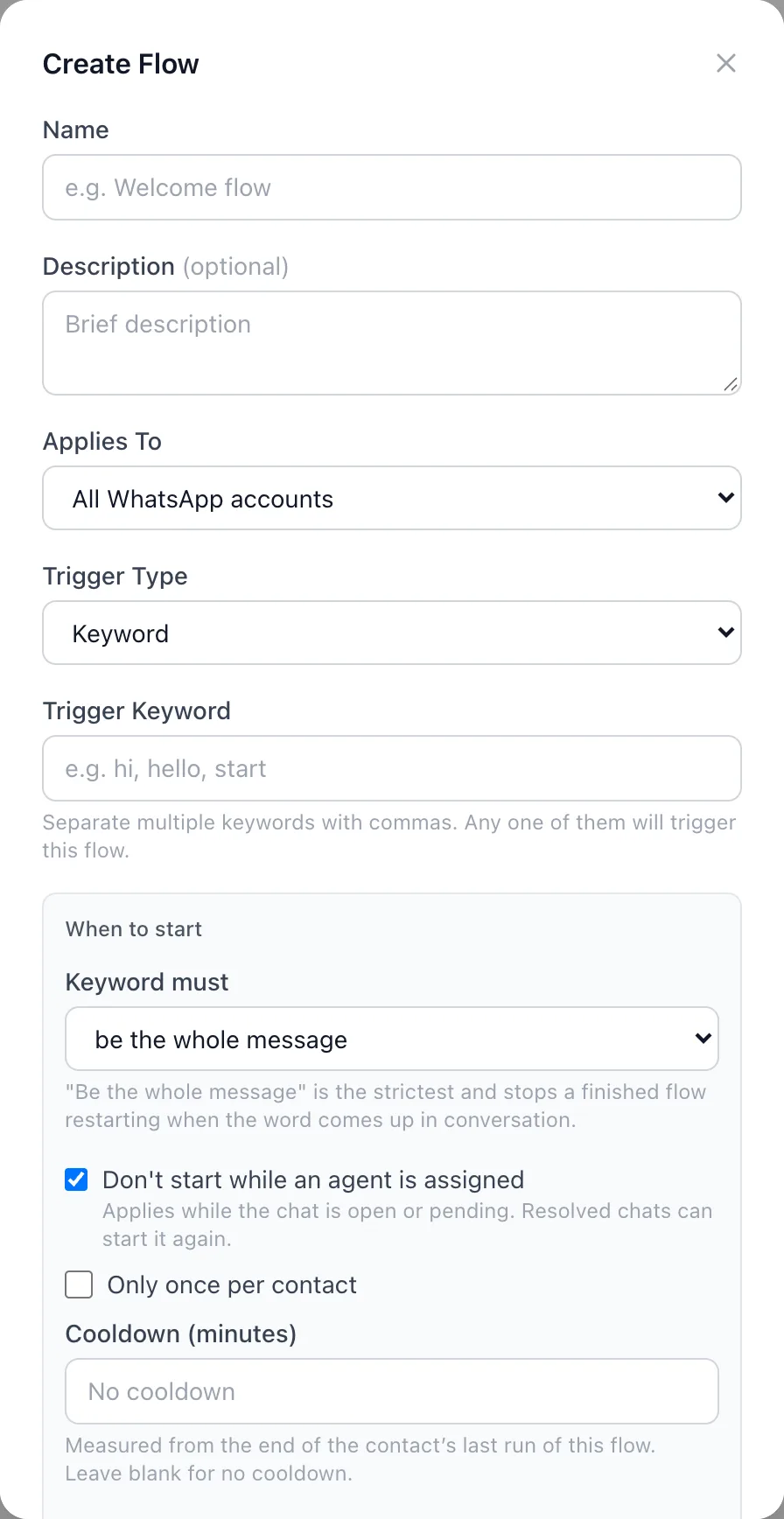
Open Automation → Chatbot Flows and click Create Flow (or From Template for a ready-made one). Enter a name, choose which WhatsApp number it applies to, and pick the Trigger Type: Keyword, Intent (AI), New contact, New conversation, All messages, Started by a workflow or Template button tap.
Set when it may start
Under When to start, choose whether a keyword must be the whole message, tick Don't start while an agent is assigned, and optionally Only once per contact, a cooldown, or only for certain contacts. You can also set this flow's own session idle timeout.
Add blocks
Click blocks in the left-hand list to add them and draw lines between them. Common blocks: Send Message, Interactive Message (buttons or a list), Ask Question, WhatsApp Form, Send Template, Condition, Update Tags (add or remove), AI Answer, AI Task, Mark as Enquiry, Update CRM Stage, Create Task and Assign Agent.
Save, test and go live
Click Save, press Test to try it, then set the flow Active in the flow list. When two flows match the same message, the newest one wins.
Frequently asked questions
Can I build a WhatsApp chatbot without coding?
Yes. BizBotify's flow builder is visual: pick a trigger, click blocks to add them, connect them, and test before going live.
How do I start a chatbot flow when a card enters a CRM stage?
Set the flow's trigger to Started by a workflow. Then click Create one in the flow's Trigger block: it opens the ready-made workflow Start a chatbot flow when a card enters a stage with your flow picked. Pick the stage and turn it on. The flow then starts when an enquiry or sale card enters that stage, including new enquiries from lead ads or website forms, so the next WhatsApp step happens automatically.
How do I hand a chat to a person?
Add an Assign Agent block and choose a teammate or team. Flows set to "Don't start while an agent is assigned" then stay out of the way.
What happens if the customer stops replying?
The flow ends after its session idle timeout; you can set a follow-up for customers who stop replying and a per-flow timeout on the Trigger block.
Can a flow use AI?
Yes. AI Answer replies from your knowledge base, and AI Task collects a list of details in a natural conversation.