
Setting Up Auto Follow-Ups
Nudge leads over days with approved templates that stop the moment they reply.
An auto follow-up (drip sequence) in BizBotify sends a series of approved WhatsApp templates on a schedule to everyone who joins it. A workflow starts it when a tag is added, a card enters a stage or a card’s temperature changes, or you add people by hand. Open Campaigns → Follow-ups → Create follow-up and complete Setup, Trigger, Messages, Audience & Safety and Review. By default it stops when the customer replies or the card leaves the stage that started it.
How to do it
Set up the follow-up
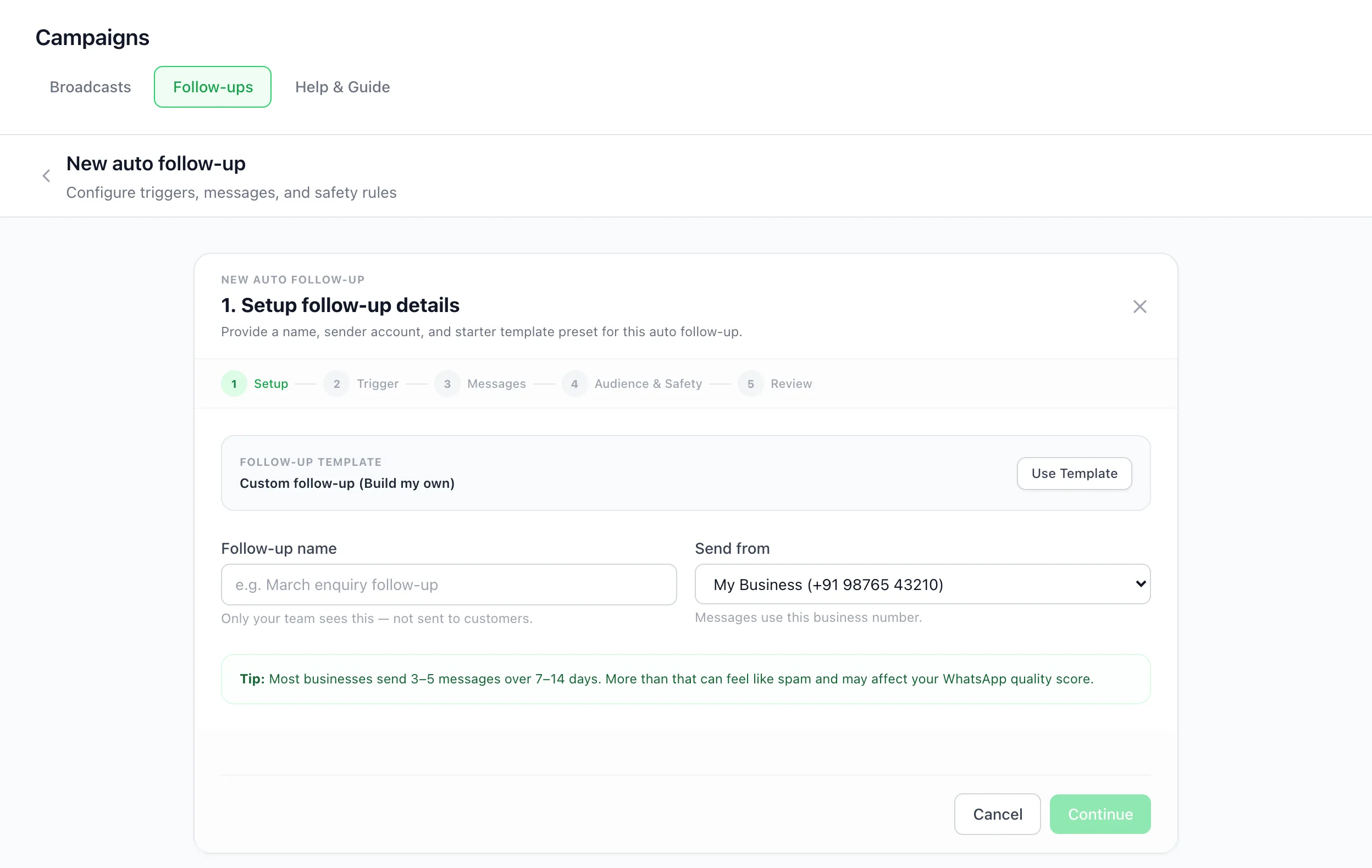
Open Campaigns → Follow-ups and click Create follow-up. Name it, choose the number it sends from, and optionally start from a follow-up template.
Choose how people join
Choose Started by a workflow or added by hand, or an Audience filter (rules on tags, stages and custom fields). You can always add people yourself with Add to follow-up from a chat or a contact’s page, and a chatbot flow’s Enroll in Nurture step adds people too.
To start it when a tag is added or a card enters a stage, save the follow-up, open it again and click A tag is added or A card enters a stage under Start it from a workflow. That opens a ready-made workflow in Automation → Workflows with a Start a follow-up step and your follow-up already picked: choose the tag or stage and click Activate. For Hot or Cold, build a workflow on A card field gets a value or changes (Temperature) with the same Start a follow-up step.
Add the messages
Add each message as an approved template with a Send Delay of now or a number of days after the person joins. Most businesses send 3 to 5 messages over one to two weeks.
Set audience and safety rules
Stop when they reply is on by default. Stop when the card leaves the stage that started it is on by default too: when a workflow starts the follow-up as a card enters a stage, the rest of the series stops once that card moves to another stage. People you add by hand stop too when their card leaves that stage. You can also use Stop when lead is closed and Stop if tagged, add safety exclusions and a re-enrollment policy. Opted-out contacts are never messaged.
Review and activate
Use Send Test to Myself, then click Activate Follow-up.
Frequently asked questions
How do I send automatic follow-up messages on WhatsApp?
In BizBotify, create a follow-up under Campaigns → Follow-ups with a series of approved templates spaced in days, then start it from a workflow, for example when a card enters a stage or a tag is added. It stops when the customer replies.
Why must follow-ups use templates?
Follow-ups usually arrive more than 24 hours after the customer's last message, when WhatsApp only allows approved templates.
Does the sequence stop if the lead moves on?
Yes, when a workflow starts the follow-up as a card enters that stage. "Stop when the card leaves the stage that started it" is on by default, including moves onto a Sales board, unless the contact has another card still in that stage. People you added by hand stop too.
Can I add someone to a follow-up by hand?
Yes. Choose "Started by a workflow or added by hand", then use Add to follow-up from a chat or a contact’s page.
Where did the stage, tag and Hot or Cold triggers go?
They are workflows now. Each follow-up that started on a stage, a tag or a temperature became a workflow named "Start follow-up:" followed by the follow-up’s name, which starts it the same way. The follow-up’s Trigger step lists it with a link. That workflow is paused if the follow-up was paused, or if it started on a won or lost enquiry stage (it never started anyone there). Turning the follow-up back on does not turn its workflow on: open the workflow and click Activate too.
Did anything change about who joins a follow-up?
Four things. It starts when the tag is added, the card enters the stage or the temperature changes, and not again while it still matches. CSV imports, the chat sync from your WhatsApp Business app and a connected app’s catch-up of old contacts never start it; a connected app such as Odoo adding the tag as it happens still does, unless that same update marks the contact inactive. A tag follow-up now starts for a customer whose enquiry is already won or lost too. And cards made by hand or from a chat still do not start an enquiry-stage follow-up when they are created in that stage, only when moved in later; the workflow’s Only if says so, and you can remove it.