
Using Canned Responses
Stop retyping your address, timings and prices ten times a day.
A canned response in BizBotify is saved text your team inserts into a WhatsApp reply. Create them under Library → Canned Responses → Add Response with a title, content, a shortcut such as /greet and a category. In a chat, type / to filter, use the arrow keys and press Enter to insert one.
How to do it
Add a response
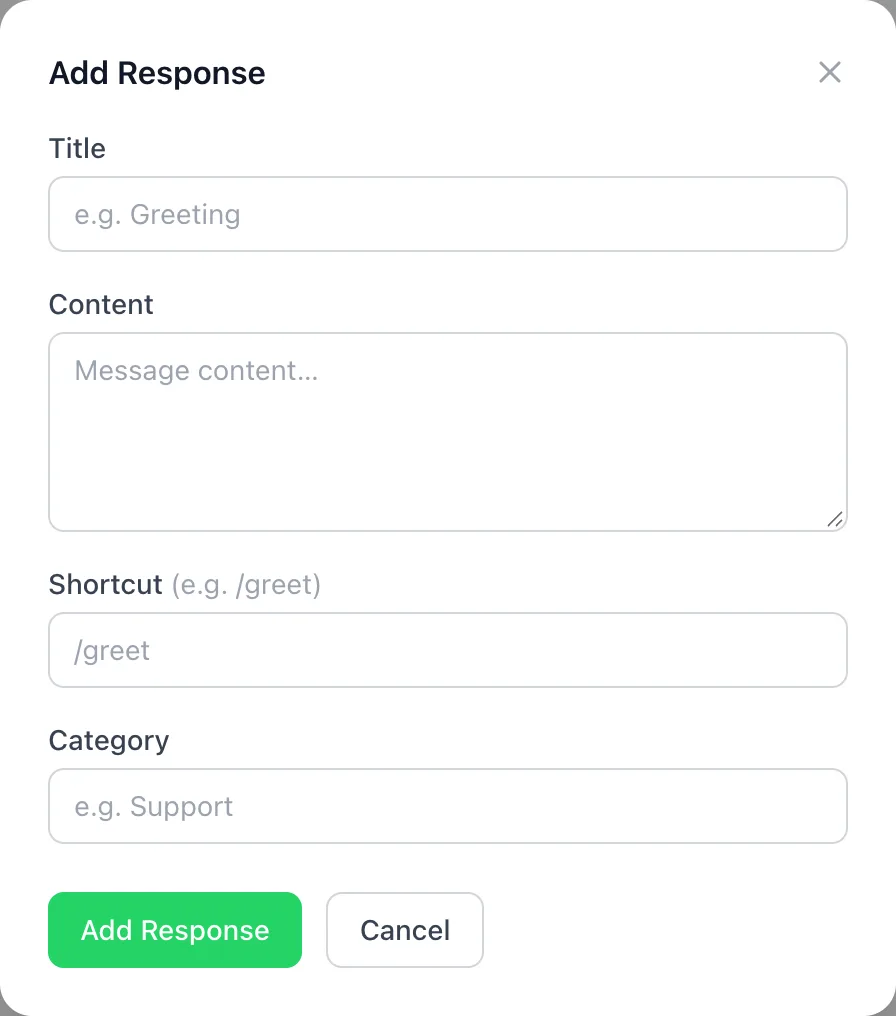
Open Library → Canned Responses and click Add Response. Fill in Title, Content, a Shortcut such as /greet, and a Category.
Insert it in a chat
In any conversation, type / in the message box, keep typing to filter, use the arrow keys and press Enter. Edit the text before sending if needed.
See what gets used
The list shows a Usage Count for each response, so you can tidy up the ones nobody uses.
Frequently asked questions
How do I insert a canned response in BizBotify?
Type / in the message box, filter by typing, use the arrow keys and press Enter.
Can the whole team use canned responses?
Yes. Responses are shared across the workspace.
Do canned responses work after 24 hours?
They are normal replies, so they work inside the 24-hour window. After that, send an approved template.