
Using the Team Inbox
Every WhatsApp conversation in one shared inbox, so nobody replies twice and nobody gets missed.
The BizBotify team inbox puts every WhatsApp chat on your business number in one place for the whole team. Use All, Mine and Unassigned to find chats, search by name or phone, and reply from the browser or phone. The ⋯ menu on a chat lets you assign it, snooze it, mark it unread or add an internal note, and the contact drawer shows the customer's details and lets you pause bot replies for that chat.
How to do it
Find the right chats
Open Inbox. Click All, Mine or Unassigned at the top; use More for Open, Pending, Resolved, Campaigns or Internal Team. Search by customer name or phone number, and pick a number from the numbers filter if you run more than one.
Reply to the customer
Click a chat and type your reply. You can reply freely for 24 hours after the customer's last message; the countdown shows at the top. After that, click Send template to send an approved template. Click Reply on a message to quote it, or react with an emoji.
Use the actions menu
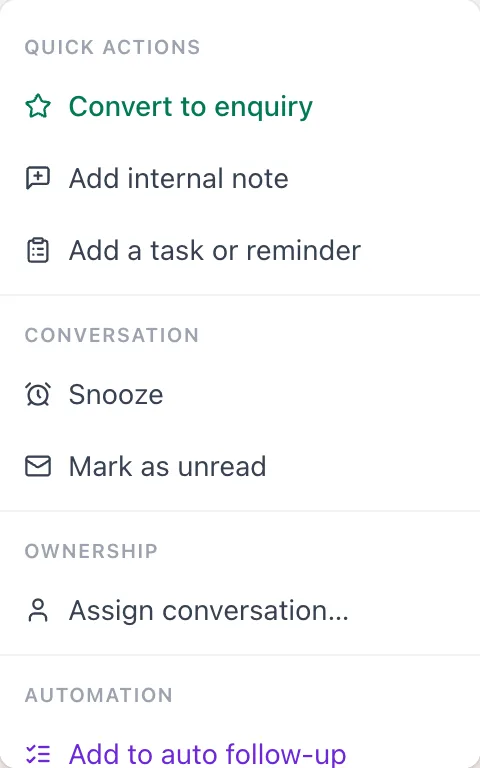
Click ⋯ at the top of the chat to assign it, snooze it until later, mark it as unread, add an internal note or a task, or turn it into an enquiry.
See customer details
Click the panel icon at the top right to open Contact Info. Click Edit on the Details tab to change details, and use + and × on the tag chips to add or remove tags.
Pause the bot for this chat
In the contact drawer, switch off Bot replies to stop chatbot flows, keyword replies and AI answers in this one chat while a person handles it.
Start a new chat
Click + next to Chats, pick the customer and number, and send an approved template to open the conversation.
Frequently asked questions
Can several people use one WhatsApp number in BizBotify?
Yes. Everyone on your team works from the same shared inbox on the official WhatsApp Business API, with filters for their own chats and roles that control what each person can do.
Why can I not type a normal reply?
WhatsApp allows free-form replies only within 24 hours of the customer's last message. After that, click Send template and send an approved template.
Can I use the inbox on my phone?
Yes. Open bizbotify.com in Chrome or Safari and choose Add to Home Screen; the inbox is laid out for phones and tablets.
How do I stop the bot replying in one chat?
Switch off Bot replies in that chat's contact drawer, or assign the chat to a person; automation stays quiet while it is assigned.